
Basic Setup
ShockOSC is now a Module in [OpenShock Desktop](https://github.com/OpenShock/Desktop)
Please go and download OpenShock Desktop to use ShockOSC.
What is ShockOSC?
ShockOSC is an OpenShock Desktop Module made for OSC to trigger your shockers from an in-game trigger. OSC is a protocol implemented in VRChat, ChilloutVR, etc. that allows the communication between the game and 3rd party applications.
What you need
Setup ShockOsc
-
Download OpenShock Desktop and install it.
-
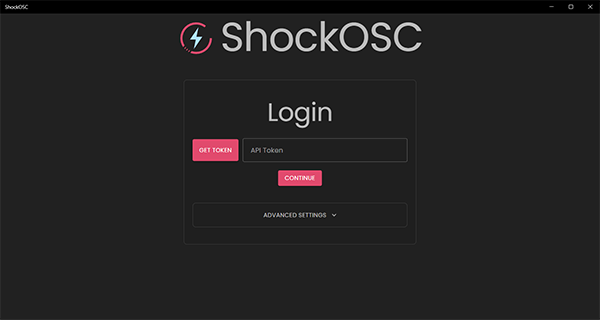
Login
- Open OpenShock (Desktop)
- Bottom left corner should say "Not Logged In", click it.
- Click Login, this will open your browser
- In the browser, log into your OpenShock account and accept the request shown.
- OpenShock Desktop will now be logged in.
-
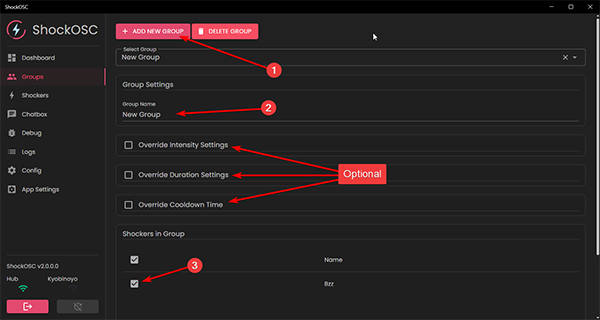
Create your Shock Group. Everything is done in groups — it doesn't matter if it's only one shocker or multiple shockers.
- Go to the Group tab.
- Create a new group.
- Give the group a name. (This also defines the parameter name later used for your avatar.)
- Select what shocker is to be used with the group.
- Optionally you can override the default limits set in ShockOSC per group.
-
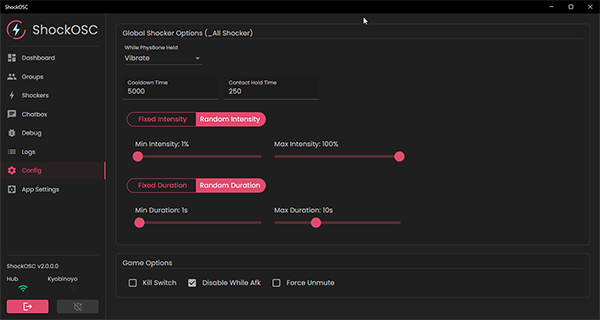
Configure your Limits.
- Go to the Config Tab
- Configure Cooldown, Hold time, if Intensity is fixed or random and the limits for that same with duration.
- Choose if ShockOSC pauses while being AFK and if it'll un-mute you when shocked.
- Everything else can be left alone unless you know what you are doing.
-
That's it, you are ready to go! 🎉
Avatar Setup
Check out the VRChat Avatar Setup or ChilloutVR Avatar Setup Guide!
Last updated on